
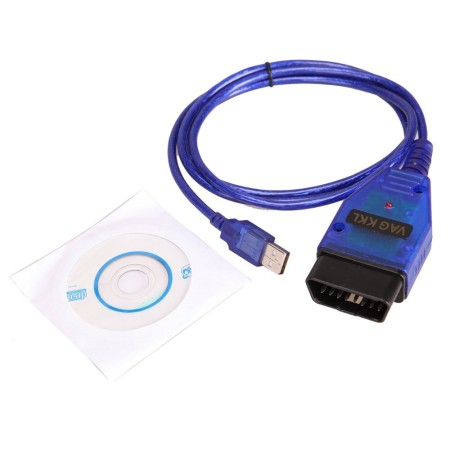


VAG COM 409.1 USB Para Diagnostico automotriz
Scanner Automotriz VAG COM409.1 con chipset CH340.


Caracteristicas:
- Funcion primaria: Cable de interface USB
- Conector OBDII: J1962 de 16 Pines macho (Va conectado al Vehiculo)
- Interface a USB incluida
- Sistemas operativos compatibles: Windows 98SE /ME /2000 /NT /XP /WIN7/8/10
- Soporta la comunicacion bus con las terminales (K) y (L) de ignicion para iniciar la ECU del vehiculo
- Soporta tres protocolos diferentes con el mismo conector OBDII, ISO/KWP, VPW y PMW
Software: VCDS-Lite Release 1.2
Existe mas software compatible, junto con versiones pagas con mayor funcionalidad
Especificaciones:
- Soporta el protocolo ISO9141
- No requiere de fuentes de alimentacion extra
- Marca VAG 409.1
- Chipset: CH340
- Voltaje de Operacion: 12v
- Dimensiones: 1cm x 30cm x 3cm
La compra incluye:
- 1 Escaner Automotriz VAG 409.1
- 1 CD de drivers
--------------------------------------------------------------------------------------------
INFORMACION PARA INSTALACION Y RESOLUCION DE PROBLEMAS CON DRIVERS
ESTA INFORMACION SE ENCUENTRA EN INGLES, pronto estara disponible en español
(DO NOT connect cable to your computer yet. Only do this when you're instructed below.)
Start by downloading the VAG-COM Driver Pack 1.
Here's how to install on different Windows versions...
Windows Vista, 7, 8, 8.1, 10:
Uncompress the file. Double-click on "Install.exe" to install the drivers. When complete — plug in cable into any USB port on your computer and wait for automatic installation to complete.
If install is successful, move onto Step 2.
If installation fails, see below: Troubleshooting: If Drivers Failed To Install
Windows XP:
- Uncompress the file. Double-click on "Install.exe" to install the drivers.
- Plug cable into any computer's USB port.
- "Found New Hardware Wizard" will start and it will ask you "Can Windows connect to Windows Update to search for the software?". Select "Yes".
- Select "Install the software automatically".
- After the installation is complete, click "Finish".
- "Found New Hardware Wizard" will start once again because there are two drivers for this cable.
- Go through the same steps as explained above to install this second driver.
If install is successful, move onto Step 2.
If installation fails, see below: Troubleshooting: If Drivers Failed To Install
Troubleshooting: If Drivers Failed To Install:


Go to Control Panel.
- Windows Vista/7/8/10: Control Panel » System » Device Manager
- Windows XP: Control Panel » System » "Hardware" tab » Device Manager
Expand "Other devices" or "Ports (COM & LPT)". Whichever contains "USB Serial Port".
Next to "USB Serial Port" — you'll see a number.
If the COM port number is between 1-4, then everything is fine. Move onto Step 3.
If the COM port number is above 4, then we'll have to change it so it's between 1-4. Here's how...
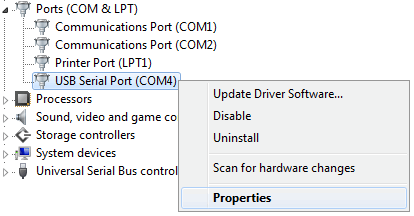
Right-click on "USB Serial Port" and click on "Properties" — as per below pic:
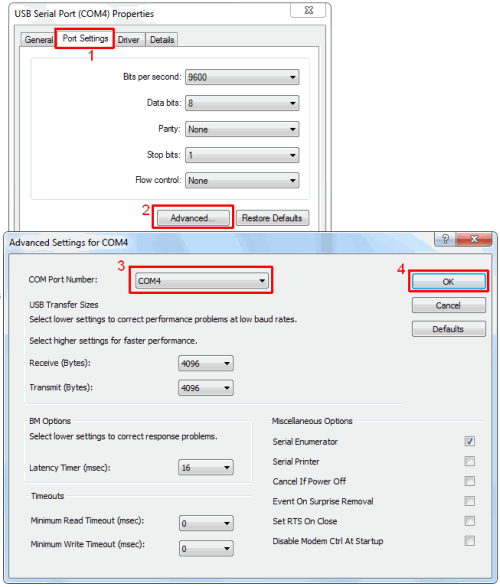
Then:
- Click: Port Settings
- Click: Advanced
- For "COM Port Number" — you MUST choose any number between 1-4.
That's it! Now let's test if everything is working. Move onto next step below...
Cable should be plugged into computer.
- Start VCDS-Lite software.
- Click "Options" button.
- You will see "Select COM Port" box. Select the "COM Port" number as explained in Step 2.
- Click the ‘Test’ button.
- If everything is good, it should display "Interface Status: Found!".
- You can now connect other end of cable to car. Turn on ignition. And you're ready to start diagnosing!
If test is not successful — check the following:
- Other software or devices using USB ports or that same COM Port could be conflicting. You should uninstall the suspected software or device for troubleshooting this problem.
- It should be noted that VAG-COM 409.1 KKL cable does not work on vehicles running on CAN-BUS System.
- Cable must be plugged into the vehicle with ignition ON.
- Test the cable with each COM Port from 1 to 4 in Windows Device Manager.
- Make sure that the driver is installed and configured as explained in Step 1.
- Only Audi, Volkswagen, Skoda and Seat vehicles are supported. Other brands will only work for generic OBD-II functions.
- If VAG-COM 409.1 KKL cable doesn't connect — or if you get the error message "Can't Synch Baud Rate" — then go to Options and set Start Baud to 9600. If 9600 doesn't work, try 4800 and 1200. Turn the vehicle's ignition OFF and back ON after each failed attempt to connect.
- If you have installed VCDS software before or from another source, uninstall all versions of VCDS software right now, and delete directory "C:Ross-Tech". Then install latest version of VCDS-Lite software by clicking here.
- Anchura
- 4.5cm
- Profundidad
- 8cm
- Sistema operativo
- Windows Vista, 7, 8, 8.1, 10
- Altura
- 2.5cm
Returns Policy
You may return most new, unopened items within 30 days of delivery for a full refund. We'll also pay the return shipping costs if the return is a result of our error (you received an incorrect or defective item, etc.).
You should expect to receive your refund within four weeks of giving your package to the return shipper, however, in many cases you will receive a refund more quickly. This time period includes the transit time for us to receive your return from the shipper (5 to 10 business days), the time it takes us to process your return once we receive it (3 to 5 business days), and the time it takes your bank to process our refund request (5 to 10 business days).
If you need to return an item, simply login to your account, view the order using the 'Complete Orders' link under the My Account menu and click the Return Item(s) button. We'll notify you via e-mail of your refund once we've received and processed the returned item.
Shipping
We can ship to virtually any address in the world. Note that there are restrictions on some products, and some products cannot be shipped to international destinations.
When you place an order, we will estimate shipping and delivery dates for you based on the availability of your items and the shipping options you choose. Depending on the shipping provider you choose, shipping date estimates may appear on the shipping quotes page.
Please also note that the shipping rates for many items we sell are weight-based. The weight of any such item can be found on its detail page. To reflect the policies of the shipping companies we use, all weights will be rounded up to the next full pound.
- "Excellent products and excellent service." - Josephine
- "Excellent value. High quality products at reasonable prices." - Warren
- "Outstanding customer service." - Jack
- "You're the best! Thank you!" - Tatiana
feedback Reportar comentario